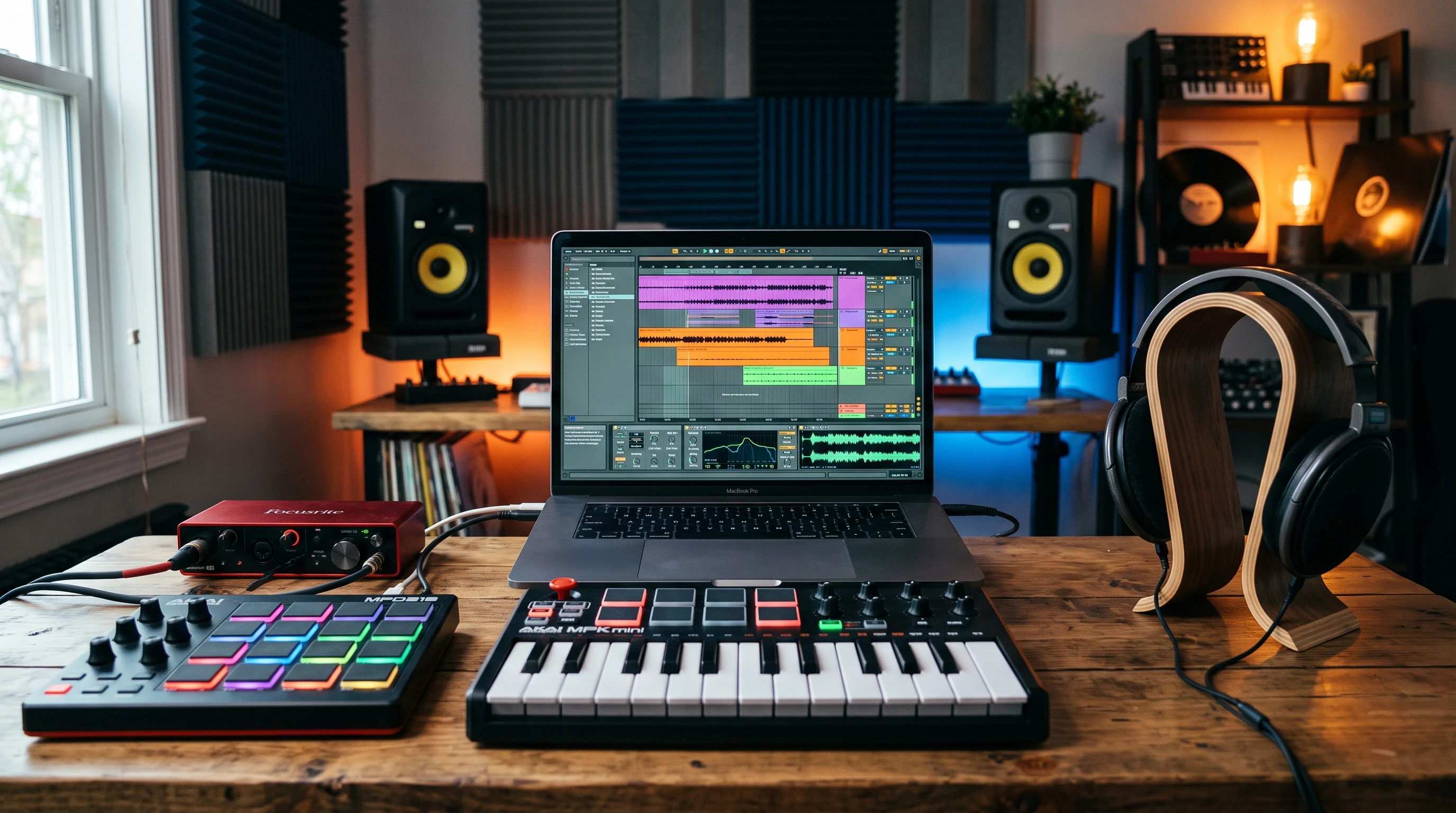
Beat-making Tips For Aspiring Musicians

Digital music production workspace with beat-making software and instrumentsBeatmaking brings together creativity, rhythm, and technology. It’s one of those skills that can feel overwhelming at first, but with a few straightforward tips and the right tools, getting into it feels way less intimidating. Whether you’re hoping to spit out energetic hiphop rhythms, smooth house grooves, or something totally your own, getting started is half the battle.

When I started beatmaking, I didn’t know what half the gear did or how to get my ideas down quickly. Over time, I picked up hacks, habits, and workflows that make everything way easier. I want to help new beatmakers skip some of those early hassles and get straight into making music they love.

This guide breaks down some of my top beatmaking tips for anyone new to producing. If you’re just firing up your DAW (Digital Audio Workstation) or still checking out what sort of gear to use, this read covers the basics you really need to know.


1. Pick Your Style and Get to Know the Basics

Choosing a sound or genre can give your early efforts some direction. If you vibe with hiphop, EDM, trap, or pop, it shapes what kind of drums, patterns, and instruments you’ll focus on.

  • Listen to Your Favorites: Make playlists of tracks in the style you want to make. Listen closely to the drum sounds, tempo, and how the instruments are layered.
  • Break Down Beats: Try to count the beats, clap along, and hear where the kicks, snares, and hihats hit. This gets you used to the patterns that give each genre its feel.
  • Set Simple Goals: Don’t stress about copying a big-name producer right away. Pick one key part (maybe the drum groove) and get good at that before moving on.

Knowing what you like makes it way easier to find your lane and guides what you learn first.


2. Gear Up: What You Really Need to Start Making Beats

You don’t need a mountain of hardware to start. A basic home setup works fine for most new producers.

  • Computer: Any modern laptop or desktop works. Music production isn’t as demanding as gaming, but faster is usually better.
  • DAW: The DAW is your main music software (think FL Studio, Ableton Live, GarageBand, or Logic Pro). Most have free trials or even stripped down free versions to learn on.
  • Headphones or Speakers: A decent pair of headphones helps you hear the details, especially if you can’t make much noise at home.
  • MIDI Keyboard (optional): This small keyboard helps you play melodies and trigger drums but isn’t a deal breaker when you’re starting; your mouse and keyboard can do the job.

Some hiphop producers love using samplers or groove boxes like the Akai MPC or Native Instruments Maschine. If you like handson, rhythmic production, these are worth checking out once you’ve got the basics down.


3. Master the Drum Patterns: The Foundation of Every Beat

Drums drive most beats, so learning how to program them is super important. Simple patterns are often the catchiest.

  • Layer Your Drums: Start with a kick (the low, punchy sound) and snare (sharp, mid/high sound). Throw in hihats for extra energy. Play around with the order to see what grooves the hardest.
  • Use Step Sequencers: Most DAWs have these built in for creating drum patterns. It’s a visual way to lay down beats without needing to “play” them.
  • Experiment with Velocity: Not every drum hit should be the same loudness or placement. Adjusting the volume or slightly moving certain hits (swing) can make your drums sound more human. Even subtle volume tweaks add feel.
  • Practice with Drum Loops: Start by copying loops from your favorite songs. Then swap out individual hits to make it your own. As you get comfortable, try creating your own loops from scratch and layering different percussion sounds for unique rhythms.

Drum patterns take practice, but putting in the reps pays off. You’ll eventually start hearing the types of beats that work and those that don’t.


4. Keep Your Chords and Melodies Simple (at First)

It’s tempting to layer a bunch of melodies and chords, but sometimes less really is more. Basic fournote chords or a repeating melody can carry a song—especially paired with a catchy rhythm.

  • Stay in Key: Most DAWs have tools to help you lock your playing or programming to a single key. This prevents unwanted clashing notes.
  • Use Presets and Loops: There’s zero shame in using builtin synth or instrument presets when you’re new. Tweaking them teaches you what you like, and you can always customize later.
  • Write Simple Hooks: The melody that gets stuck in your head is usually the simplest one. Hum some ideas, then try to recreate them in your DAW. Sometimes a two or three-note riff can bring a track together better than a busy solo.

Good melodies and catchy chord progressions will come with a bit of ear training and practice. Don’t overload your first beats with too many competing parts.


5. Practice Regularly and Capture All Your Ideas

Consistency beats long breaks. Put aside time each day or a few times a week to work on music. Progress piles up fast when you work regularly.

  • Make Short Beats Often: Try to finish one quick loop or beat per session, instead of laboring over a single track for weeks. Making lots of ideas gives you more material to use later.
  • Record Every Idea: Always save your ideas—even if they seem rough. Phones are great for voice notes. Old “bad” beats sometimes become building blocks for something cool later.
  • Accept Imperfection: Not every beat will be a banger. It’s totally normal to have a bunch of stuff you don’t love right away; it’s part of figuring out your style.

Practicing every day, or as much as possible, really helps you build muscle memory and creative confidence. With time, you’ll spot improvement in both your beatmaking speed and your ear for what works.


6. Team Up and Get Feedback

Making beats with other musicians or sharing your work with friends can speed up your growth. Fresh ears notice things you miss after hours of tweaking.

  • Share Early and Often: Even if the beat isn’t “done,” get a second opinion. Honest feedback helps you get better way faster.
  • Work With Singers and Rappers: Producers and vocalists push each other creatively. You learn what makes a beat easy to write to, and they help point out grooves or hooks that work best. Plus, collaborating adds even more inspiration to your process.
  • Check Out Online Communities: Places like Reddit’s r/makinghiphop, Discord servers, or local Facebook groups are great for sharing, collabs, or just asking questions when you get stuck.

I always learn something new from other musicians, even if we don’t have the same style. Teaming up makes beatmaking a lot more fun and inspiring.


7. Explore Effects and Mix Basics

You don’t need to learn prolevel mixing right away, but some basic effects and mix tricks make your beats sound way better. A little polish can go a long way, and simple mixes help musicians add layers or vocals easily when collaborating.

  • EQ: Use this to shape the sound, like removing harsh highs or muddy lows from certain instruments.
  • Reverb and Delay: Add some space and character to drums or melodies. Just don’t go overboard—a little goes a long way and helps keep the beat crisp.
  • Levels and Panning: Make sure nothing is too loud or too quiet, and spread instruments left and right so your mix feels wide and balanced. This keeps things interesting and gives everything a place in the stereo field.

Many DAWs have tutorials or builtin help sections that show what each effect does, so don’t be afraid to experiment. As you step up your skills, learning more about compression and effects chains adds new depth to your tracks.


Final Thoughts

Beatmaking is pretty rewarding once you get rolling. Sticking with these habits—choosing a genre, practicing often, learning your gear, and reaching out to others—makes it way easier to grow into the producer you want to be. Don’t overthink things or get bogged down in gear envy. Your style will come with experience and curiosity. Any tips or favorite beatmaking hacks to share? Drop them below!

Which music style is best for beats?

There is more than one music style where beats are produced in, and in which you can make beats. Which music style is best for beats you like would be a better question, because probably, like everyone, you prefer one or more of the music styles over the others because of your own taste. There are several music styles where beats are used in, including pop music, hip hop, house, techno, reggaeton and drum n bass. Though, one could say that hip hop is the most outstanding because of the practice to sample old vinyl records and because there is often a little bit swing and also groove in it.

Hip Hop alone has several different styles:

Boom Bap, Trap, Drill, Phonk, Lo-Fi Hip Hop, Cloud Rap, Miami Bass, Crunk and Hyphy.

Electronic dance music (EDM) has the styles Deep House, Tech House, Progressive House, Electro House, French House / Filter House, Tropical House, Future House, Afro House, Detroit Techno, Minimal Techno, Industrial Techno, Hardtechno / Schranz, Melodic Techno, Acid Techno, Dub Techno, Trance, Classic/Uplifting Trance, Drum & Bass, Jungle, Rollers, Dubstep / Bass Music, Dubstep, Brostep / Riddim, Future Bass, 2-step, Grime, Bassline / Speed Garage, UK Hardcore / Happy Hardcore, Hardstyle, Gabber / Hardcore, Ambient / Chillout, IDM (Intelligent Dance Music), Breakbeat / Big Beat, Wonky / Glitch, Footwork / Juke, Vaporwave / Synthwave – Retrowave, Amapiano, Reggaeton / Latin EDM , Cumbia Electrónica, Phonk, Drift Phonk, Hyperpop Breakcore, Sped Up / Nightcore. Pop & Mainstream has got Pop, Dance-Pop, Synth-Pop, R n B, Afrobeats, Latin Pop/Reggaeton and K-Pop, for the Caribbean and Africa there is Dub, Dancehall, Afro beats, like already mentioned, Afro House / Tribal House, Gqom, Kwaito, Amapiano, Naija Afrobeats Remix, Azonto, Singeli, Rai-House / North African Electronic, Mahraganat, Shangaan Electro, Ndombolo, Coupe-Décalé and Bongo Flava. In the asian field there is the japanese Denpa, J-Trance, Japanese Vaporwave, Kawaai Future Bass, City Pop, Chiptune, the indonesian Jedag-Jedug / Full Bass, the philippinean Budots, the Vietnamese Vina House, the chinese Mandopop, Mic Shouting / Hanmai and Tuhai, in Thailand there is Mor Lam and Luk Thung, in South Korea K-EDM.

All of these music styles carry electronic beats, and if you like one or more of them, you can make your own beats in one or more of those styles. As you can see, there is no single best music style for making beats, the only thing which would make one the best would be the fact that you like it best.

If you liked the article and / or have questions, please leave me a comment below.

How long is a 4/4 bar with 85 bpm?

Hi! This is an important question for people who like HipHop, meaning Old School Boom Bap. Old School Boom Bap is typically around the tempo of 85 bpm and faster, so if you can remember this tempo, if you can clap it with your hand or snap it with your fingers, you could do your own freestyle rap session with the typical Hiphop-Tempo. If you measure the length of one bar having 4 beats in the tempo of 85 bpm (beats per minute), you will see that it is approximately 2 seconds and 69 microseconds long. If you have a song that has 80 beats that are this fast, you would have twenty bars (80 divided by 4) with the speed of 85 bpm.

If you multiply 80 (beats) with the duration of 2.69 (seconds), you receive 215.2 (seconds). This are three minutes and 20.2 seconds.

There are lots of good songs that take around three minutes, so now you know, if you take twenty 4/4 bars in a speed of 85 beats per minute (bpm), or 80 beats at all in that speed, you receive a song length of a little bit more than three minutes, giving you a convenient song duration that can be very entertaining and is a good orientation length for your own songs, which you can take no matter which music style you are making beats in!

In order to measure the bar durations yourself, you need a metronome (app) and a stop watch (app).

Quick-Fix for memorizing music tempo:

If you want to get used to the different music speeds (tempo), also by memory, you can take a watch or a timer and let the seconds count. If you take two even beats for one second and count them loud or clap them with your hands (or snap them with your fingers) while the seconds go by, you get a song speed of 120 bpm. You can also use more seconds and take more or less beat tempo for this time space and test out the beat tempo that you imagine or shout out loud or clap with the hands while letting the seconds go by. Like this you can get a feeling for the different tempos and practice different speeds without having a metronome with you. But keep in mind: if you count slower it will take more repeats of seconds going by.

For example:

●——●——●——●——●——●——●0 ½ 1 1½ 2 2½ 3 ← Seconds

●——————●——————●——————●——————●——————●——————●0 1,5 3 4,5 6 7,5 9 ← Seconds

You see, if you clap your hands twice a second with even duration (each clap is exactly the half of a second) the repeats are less to finish the cycle as if you take longer to clap in your hands again, in the second diagram using a tempo of 40 bpm.

If you have questions and/or liked the article, please leave me a comment below!

The two approaches in beat-production

Hi!

There are two ways to make beats: one is where you do samples of your own and compose the beats from those samples on your sampler and the other is where you rely on the samples of digital audio workstations. The second one is easier for beginners because it doesn’t take so long to get results.

For this, you only need a computer, a digital audio workstation and a headset which is good enough, meaning over-ear-headsets.

If you already have a computer, fine, so you only need the headset and the right digital audio workstation. There are lots of different audio workstations, for example Fruity Loops Studio or Ableton Live.

If you choose Ableton Live, there is the advantage that you can use it together with a music controller, which lets you submit your own musical ideas to the program in the intuitive, felt way like you would for example drum it with your fingers.

For example, if you choose to use a drum pad, you can easily put in the sounds when you connect the drum pad (music controller) to your computer and thus to the DAW. When you buy an Akai MPD 218, the music software Ableton Live Light is contained in the product, and you can install it on your computer and also register yourself. This also gives you the opportunity to watch the Tutorials that Akai gives out.

If you do this, you can start out making beats very fast and see your first results! It is also relatively cheap, and the fact that you got your own headphones lets you save a lot of money for the studio surrounding that you would have to establish when not having headphones, meaning for example monitor speakers on both sides of your workstation / your computer.

Two different approaches in beat-production again lead together

The other approach where you do your own samples takes longer at the beginning, because you first build up your own sound library, then you load the sounds into your DAW or simply let them stay in your sampler. From there on, you compose your beats on the sampler and also save them on the sampler. The best brand and sampler for this is the Akai MPC.

You can also combine this approach with the other method, meaning that you compose little blocks of music on your sampler (using your own little samples) and then load those into the DAW of your choice to use the advantages of this and this style of working (workflow). This gives you the opportunity to gain very high quality sound that you created yourself, and the opportunity to process and create it on your computer. You then have the advantage of a big screen and can combine tools and effects of the digital audio workstation together with your own high quality samples on top.

If you liked this article and/or got questions, please leave a comment below!