
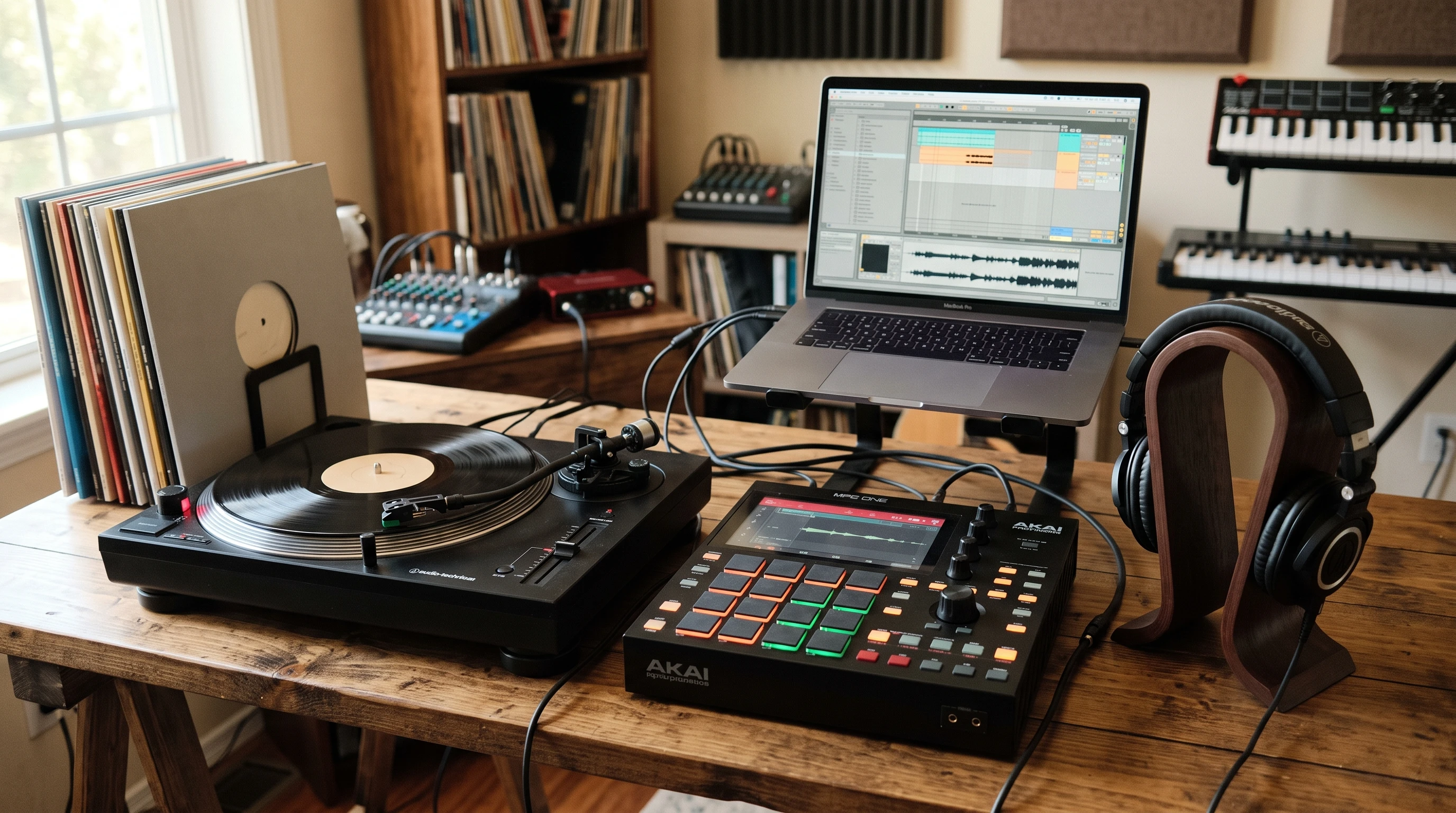
 Making your own beats is a great way to express your creativity and start making music, no matter what your background is. The basic process involves gathering some equipment, finding your sound material, and learning how to put everything together. Anyone can get started with the right approach, and you do not need a fancy music studio or a lot of money to begin.
If you have ever listened to hip hop, electronic, or pop music and wondered how those catchy, moving instrumentals are made, beatmaking is where it all begins. Sometimes it can feel confusing to know what you need or how to actually try it for yourself. I want to share the straightforward basics you need, some options for gear, and tips for building out your own style of making beats.
This summary covers what you really need, different ways to find unique sounds, and some advice for connecting with others so you can keep learning and improving your skills. No matter where you begin, remember that beatmaking is about experimenting, learning by ear, and enjoying the process. Even simple equipment can lead to impressive results when matched with curiosity and regular practice.
What You Need To Make Beats
When I first started, I quickly learned that making beats does not need a huge investment or massive studio. Having a few reliable pieces of equipment helps a lot. You don’t need the flashiest gear; even basic tools can unlock your creative ideas.
- Audio sampler or beat machine: The classic Akai MPC is a favorite for handson sampling, chopping, and arranging beats. The big, friendly buttons and the pad layout make it easy to create something unique and experiment with old sounds.
- Computer and DAW (Digital Audio Workstation): If you prefer working on a screen, a decent laptop and a DAW (like FL Studio, Ableton Live, or Logic Pro) are enough to get started. You’ll need this if you want to work with software instruments, plugins, or do complex arranging and mixing.
- Vinyl record player or audio source: For sampling your own sounds, vinyl records are the top choice. Classic records from any thrift shop or record store can give you tons of material to chop up and loop. You will also need a way to connect your record player to your sampler or computer.
- Good headphones or speakers: You need to clearly hear the details of your beat. Overear headphones are my personal favorite, especially for working late or in shared spaces.
Some extra cables and maybe an audio interface help with sound quality, but you do not need to go overboard right away. Most beginners make do with what they have and upgrade slowly as they learn more about their preferences.
How Sampling Makes Your Beats Stand Out
Most of the best beats start with a good sample. When you do sampling, you cover a big field in making beats and you learn how to make beats in building your own sound library, as you then create own peaces of music out of this. Sampling just means taking a small piece of audio from somewhere else, usually a song or an old record, and then making it your own.
- Vinyl for sampling: I recommend using vinyl records because they carry a warm, deep sound that digital files or most synths just do not have. Anything from classic soul tracks to old rock albums can be flipped into a new piece of music. Checking out crates at a record shop or even using records from relatives is a great way to find material that not many others have sampled.
- What to look for: I often listen for drum breaks, melodic hooks, or interesting little sounds that can be looped or layered. The more creative you get with your source material, the more original your beats will sound.
- Sampling legally: If you’re just making beats for yourself or learning, you usually do not need to worry about copyright. But if you start making money or sharing your music widely, keep in mind that longer or more recognizable samples can get you in trouble. Sampling short pieces or making big changes, like chopping up the sample or layering effects, helps avoid headaches later.
Expanding your sampling mindset, you can even dig into sound snippets from field recordings, Internet archives, or audio from old movies. With each new piece you add, your potential for creative, personal beats only grows.
Why the Akai MPC is a GoTo Tool
The Akai MPC is famous for good reason. I recommend it if you want a physical, handson way to create. The feel of the pads, fast workflow, and easy sampling make it great for beginners and experienced producers alike.
- Goldplated connectors mean when you sample from records, the sound quality is super clean. The transfer from vinyl to your device stays rich and crispy, so you keep all that analog character in your beats.
- Physical workflow: Some people like using a mouse and screen, but when I’m tapping out a groove and loading samples, nothing feels as creative as an MPC. There is something about being able to press pads, adjust your start and end points, and play with timing that sparks more ideas.
- Connectivity: Many machines, like newer MPCs, let you move beats to or from your computer for mixing or finishing songs later.
If you only want to make beats on a computer, that is totally fine. Just make sure you have a DAW you enjoy and a USB record player for easy sampling. Some users are choosing software emulators that mimic the classic MPC workflow on their laptops, making it easy to practice those signature techniques.
Building Your Own Sound Library
This one is really important. To make beats that are uniquely yours, you should start collecting your own set of sounds. I usually grab lots of small audio snippets—drum hits, weird vocals, horn stabs, or any little noise with character. By cutting up short sections from records or recording environmental noises, I can mix and match to make new beats every time.
The best way to keep samples organized is by naming and sorting them on your device. I usually have folders for drums, melodies, sound effects, and more. Having my own custom sound library keeps my workflow fast and makes every beat sound a bit different from the last.
- Sample things short enough to avoid copyright problems, but long enough to be useful.
- Recording stuff from your surroundings—street noises, nature, or old movies—keeps your beats fresh and personal.
- Try layering samples from different sources together. This is how new genres and styles are born. Sometimes blending sounds from nature with classic vinyl chops builds fascinating textures that cannot be achieved otherwise.
Dig into building a sound library that reflects your musical interests and personality. You might stumble upon unusual sounds during travels or by recording friends’ instruments. Try saving a unique folder for rare samples so you can return and experiment with new ideas over time.
Using a Computer Only Setup
There’s no rule that says you need an MPC or hardware sampler. If you have a computer, a DAW, and good headphones, you can make beats right now. USB turntables make it easy to sample from vinyl into your DAW. Software samplers and drum machines come builtin with most DAWs, so it’s easy to experiment even if you do not own any records yet.
(I started out using a new drum pad and the delivered free licence of a DAW (Ableton Live Light), using the drum pad as controller to put in my sound ideas to the DAW with my own hands like playing an instrument.) As you grow, you can add instruments or plugins, but you do not need to rush out and buy everything from day one. There are thousands of tutorials and forums online that help you jump into beatmaking with just a laptop and headphones.
With technology today, you can put to work entire sample packs, find downloadable sounds, and edit your music within minutes. Try out new digital tools to see what blends with your workflow. The digital world gives you flexibility and room to grow as your styles and skills expand.
Joining a Beatmaking Community Online
If you want to learn quickly and have fun while doing it, joining an active online community is super important. Beatmaking forums, social media groups, and even Discord servers are filled with producers who share tips, answer questions, and give helpful feedback on your tracks.
- Why join? You do not need to search for answers alone. Odds are, someone else had the same question you do and can point you in the right direction.
- Learning new tricks: I found out about new plugins, better ways to chop samples, and mixing tips just by talking to other producers and asking for ideas about my tracks.
- Opportunities to team up: In many groups, you can trade sounds, work on tracks together, and even share your beats for contests or online releases.
Some popular forums include Gearslutz, the r/makinghiphop subreddit, and niche Discord channels. Following a few beatmakers on YouTube can help you pick up new skills at your own pace. Real feedback and honest discussions go a long way in helping you improve, keep motivated, and find inspiration. Joining a community opens doors to collaborations and friendships that can give a real boost to your musical passion.
Common Questions & Quick Fixes
Do I need expensive gear?
No, you can start with a basic setup. A computer, DAW, and headphones are enough. If you want to sample vinyl, a budget turntable and cheap records work great.
I can’t find good samples—what should I do?
- Check local thrift stores or used record shops for cheap records. Sometimes you’ll track down classic gems hiding in dusty bins.
- Listen through old radio, movie soundtracks, or even sounds in your neighborhood for inspiration. Get into field recording sessions by using your phone or portable recorder on daily walks.
- Use online sample packs if you’re just practicing, but try to create your own library over time. The more you mix in some variety, the more your sound will set you apart.
How do I get better at making beats?
Practice is the key. Try making a new beat every day or every week, even if some of them come out weird. Ask for feedback online, copy beats you love for practice (but keep those private), and experiment with new sampling sources or drum patterns. Over time, you’ll start to develop your own unique style. You can also size up your old tracks to see how far you’ve come and set new goals for your skills.
Next Steps for Beginner Beatmakers
The best way to learn is by doing. Spend time listening to your favorite producers, find out what equipment feels best for you, and collect sounds that excite you. Grab a record or two, fire up your sampler or DAW, and just try making something for yourself. Remember, there is no right or wrong—just start experimenting, make mistakes, learn, and have fun.
Your Beatmaking Starter Plan:
- Pick your main setup—hardware sampler or computer/DAW. Try out both if you can, then settle on what makes you feel creative.
- Get a few records or sample packs. Dig into thrift shops, explore online resources, or ask friends for interesting audio material.
- Chop up audio and experiment arranging your first beats. Save all your work, so you always have new ideas to revisit and grow from.
- Join an online group to get advice and inspiration. Listen, ask, and share your progress—community support makes a big difference.
I hope you get started on your beatmaking adventure and have fun creating! If you have questions or want to share your ideas, drop a comment below. Remember, every beatmaker develops their sound one experiment at a time, so jump in and keep building your own path.
This post made me smile because my son has recently gotten into making his own music, and as a mom, it’s been amazing to watch his creativity unfold. I love how you emphasized that beatmaking doesn’t require a huge investment, just curiosity, practice, and a willingness to experiment. That’s exactly what I’ve been encouraging him to do: start small, enjoy the process, and build his own sound library over time.
From your experience, do you think it’s better for beginners to focus first on mastering one setup (like a DAW on the computer) before branching out into hardware like an MPC, or is experimenting with both early on more beneficial for developing a unique style?
Hi Celia,
thank you for reading my article. Yes, it’s true, making beats doesn’t involve a huge investment. I personally would always recommend to get an own MPC, because like this the overall experience of building up an own music library is the best and leads to the best results. So yes, if it’s financially affordable, I would say everyone who begins should do this, if he’s got the patience and the money. But if not, it’s also okay to take computer, headphones, DAW, own records and a USB vinyl player for the computer (because sampling is also possible with the computer).